
Introduction
Understanding how googlebot decides which sitemap to crawl first crawl budget is important for website owners, bloggers, publishers, and SEO professionals who want their important pages to be discovered efficiently by Google. A website may contain hundreds, thousands, or even millions of URLs, but submitting a sitemap does not guarantee that Google will crawl every URL immediately or index every page.
Instead, Google considers factors such as crawling capacity, demand for individual URLs, website popularity, content freshness, internal linking, and server performance. Sitemap information helps Google discover URLs and understand when pages have been updated, but it does not guarantee a particular crawling order.
This guide explains how googlebot decides which sitemap to crawl first crawl budget considerations affect website crawling, what crawl budget means, how Google discovers and processes sitemap URLs, and how to improve your website’s crawling efficiency.
1. What Is Crawl Budget? Understanding the Basics
What is crawl budget? Crawl budget refers to the URLs Google can and wants to crawl on a website within a given period. Google describes crawl budget in terms of two main concepts: crawl capacity limit and crawl demand.
Understanding both concepts helps explain why Google may crawl certain pages more frequently than others.
When learning how googlebot decides which sitemap to crawl first crawl budget is a key consideration because Google must balance its crawling resources with the demand for pages on each website. However, crawl budget alone does not determine which sitemap file is fetched first.
Crawl Capacity Limit
The crawl capacity limit concerns how much crawling a website can handle without affecting its performance. Google attempts to crawl efficiently while respecting a website’s ability to respond to requests.
Several factors can influence crawling capacity:
- Server response time and reliability.
- The number of successful requests the website can handle.
- Server errors, including HTTP 5xx responses.
- Rate-limiting responses, such as HTTP 429.
- Website hosting resources and overall performance.
Crawl Demand
Crawl demand concerns Google’s willingness to crawl particular URLs. Even if a server can handle many requests, Google does not necessarily need to crawl every page frequently.
Demand can be influenced by:
- The popularity and importance of URLs.
- How recently pages were crawled.
- Whether content has changed significantly.
- Internal links and the site’s URL structure.
- Duplicate or similar URLs.
- Google’s understanding of which pages are useful.
For more information, read Google’s official guide to crawl budget management.
2. Crawl Budget in SEO: Why It Matters for Websites

Crawl budget in SEO matters because search engines need to discover and revisit pages before they can evaluate their content for search results. However, crawling, indexing, and ranking are separate processes.
A well-organized website makes it easier for search engine optimization to discover useful content and understand how pages relate to one another. This is an important part of understanding how googlebot decides which sitemap to crawl first crawl budget should be managed: the aim is to make valuable URLs easy to discover, rather than trying to force Google to follow a specific sitemap sequence.
Consider a website with 50,000 URLs. If 15,000 URLs are duplicate filter combinations, outdated parameters, or low-value pages, Google may spend time processing URLs that provide little additional value. Cleaning up unnecessary URL variations can help Google focus on the pages that matter most.
3. Google Crawl: How Googlebot Discovers and Fetches URLs
A Google crawl begins when Google’s crawling systems discover URLs and determine which resources to request. Googlebot is the name commonly used for Google’s web crawler.
Google can discover URLs through several sources, including:
- XML sitemaps.
- Internal links.
- Links from other websites.
- Previously discovered URLs.
- Redirects and other known URL relationships.
However, submitting a sitemap is a discovery signal, not a guarantee. Google may decide not to crawl every submitted URL, and crawling does not guarantee indexing. Therefore, when investigating how googlebot decides which sitemap to crawl first crawl budget behavior, distinguish between sitemap discovery, sitemap fetching, and the actual crawling of individual pages.
Sitemap Discovery Versus URL Crawling
It is important to distinguish between fetching a sitemap file and crawling the URLs listed inside it.
Google may fetch a sitemap, process its entries, and then schedule some of the discovered URLs for crawling. These are related activities, but they are not the same event. If you want to understand how Google crawls the web, it helps to separate the process into several stages. These stages also clarify why how googlebot decides which sitemap to crawl first crawl budget is not a matter of following a fixed list of URLs in order.
This is why sitemap submission status alone cannot prove that every listed page has been visited.
5. How Googlebot Decides Which Sitemap to Crawl First
The central question is whether Googlebot follows a fixed order when fetching sitemap files.
The answer is no: Google does not publish a universal sitemap-fetching order that website owners can control. There is no reliable rule stating that Google always fetches the homepage sitemap, product sitemap, blog sitemap, or sitemap with the most URLs first.
When analyzing how googlebot decides which sitemap to crawl first crawl budget behavior, remember that fetching a sitemap and crawling the URLs inside it are separate actions. Google may discover several child sitemaps from a sitemap index and fetch them at different times according to its systems and scheduling.
Several factors can help explain the behavior you observe.
Sitemap Index Structure
A sitemap index groups multiple sitemap files into a central index. For example, a large website may have:
pages-sitemap.xmlproducts-sitemap.xmlcategories-sitemap.xmlblog-sitemap.xmlimages-sitemap.xml
The sitemap index allows search engines to discover these files without requiring every URL to appear in a single sitemap.
However, listing products-sitemap.xml first does not guarantee that Google will fetch it first. The sequence in the XML file is not a priority command.
The Role of the Sitemap’s Last Modification Date
A sitemap index can include a <lastmod> value for a child sitemap. When this value accurately reflects a meaningful change, it may help Google understand that the sitemap has been updated.
For example, if 500 product pages have been updated and the corresponding sitemap accurately reports its modification date, that information can help communicate freshness.
However, a recent <lastmod> date does not force Google to fetch the sitemap immediately. Nor does it guarantee that Google will crawl every URL listed inside it.
Avoid updating sitemap timestamps simply because you want to attract Googlebot’s attention. Incorrect metadata can reduce the usefulness of the signal.
URL Importance and Internal Links
Google can discover important pages through internal links independently of their sitemap position. A page linked from a prominent category page may be easier to discover than an isolated URL with no internal links.
Internal linking also helps Google understand relationships between pages.
For example, a product page linked from the main navigation, its category page, and relevant buying guides has several discovery paths. A product URL included only in an XML sitemap may have fewer ways to be discovered through the site’s internal structure.
This does not establish a guaranteed crawling order, but it makes a website’s architecture more useful for discovery.
A Practical Example
Imagine a fashion e-commerce website with 20,000 products, 800 categories, and 300 blog posts. Its sitemap index lists the product sitemap first.
The owner expects Google to fetch the product sitemap before all other sitemap files. However, server logs show Googlebot fetching the blog sitemap on Monday, the category sitemap later that day, and the product sitemap on Tuesday.
The more useful questions are:
- Are the important product URLs discoverable?
- Are sitemap files returning successful responses?
- Are valuable pages being crawled?
- Are unnecessary URL variations consuming resources?
- Are important pages internally linked?
- Are crawling and indexing errors increasing?
Answering these questions provides more actionable information than trying to force a particular sitemap-fetching sequence.
6. Crawl Meaning: What Is the Difference Between Crawling and Indexing?
The crawl meaning in SEO is the process of a search engine’s crawler requesting and processing URLs. Indexing is the separate process of evaluating and potentially storing page information in a search index.
These terms are related, but they should not be used interchangeably.
| Term | Meaning |
|---|---|
| Crawling | Googlebot requests and processes a URL or resource. |
| Indexing | Google evaluates and may include a page in its search index. |
| Ranking | Google’s systems determine where eligible pages appear for a search. |
| Sitemap submission | A website provides a list of URLs to help search engines discover them. |
A website owner might submit 1,000 URLs to Google, but Google may crawl only some of them initially. Of those crawled, some may not be indexed.
Common reasons include duplicate content, canonicalization, indexing directives, server problems, and content that Google does not consider suitable for its index.
If an important URL is not indexed, investigate the URL’s status instead of assuming that the sitemap order is the cause. This distinction is essential when evaluating how googlebot decides which sitemap to crawl first crawl budget issues because an indexing problem may have nothing to do with sitemap fetching.
Google’s documentation on crawling and indexing provides more detail about these processes.
7. Google Search Console: How to Check Sitemap Crawling
Google Search Console is one of the most useful free tools for understanding how Google interacts with your website. It helps you inspect sitemap processing, individual URL status, and certain crawling issues.
It does not provide a complete live queue showing exactly which sitemap Google will crawl next.
Check the Sitemaps Report
Open Google Search Console and select your website property.
- Navigate to the Sitemaps report.
- Submit your sitemap index or individual sitemap.
- Review the reported status.
- Check the last read date, if available.
- Investigate any processing errors.
- Confirm that the sitemap URL returns a successful response.
A successful sitemap status means Google was able to process the sitemap successfully. It does not mean every URL inside it has been crawled or indexed.
Inspect Important URLs
Use the URL Inspection tool to investigate important pages individually.
Check whether Google has discovered the URL, whether it has been crawled, whether indexing is allowed, and whether Google reports a canonical URL.
If a page is not indexed, the inspection information can help identify possible reasons. The exact information available depends on the URL and the tool’s reporting.
Review the Crawl Stats Report
For eligible properties, the Crawl Stats report provides information about Google’s crawling activity, including request volume, response times, and host status.
Look for patterns such as:
- A sudden increase in server errors.
- Slow average response times.
- Unexpected changes in crawling activity.
- Large amounts of crawling involving unnecessary URLs.
- Differences between successful and unsuccessful requests.
Compare changes with deployments, migrations, hosting incidents, or significant updates to your URL structure.
8. Google Crawl Limit: What Controls Google’s Crawling Capacity?
The phrase Google crawl limit is often used to describe the amount of crawling Google can perform on a site. However, there is no single public daily URL limit that applies to every website.
Google’s crawling capacity varies according to website conditions and its own systems. The amount of crawling Google wants to perform may also differ from the amount the server can support.
When researching how googlebot decides which sitemap to crawl first crawl budget limits, avoid assuming that Google assigns every website the same fixed number of daily requests. Capacity and demand can vary, and Google ultimately determines its crawling schedule.
Factors That Affect Crawling Capacity
- Server performance: Slow responses can make requests less efficient. Improving hosting performance and caching may help.
- Server errors: Repeated 5xx errors and 429 responses can indicate that the server is struggling or restricting requests.
- Website size: Very large sites naturally have more URLs to discover, crawl, and maintain.
- URL duplication: Parameters, filters, session identifiers, and alternative URL versions may create unnecessary crawling opportunities.
- Content changes: Pages that change frequently may need revisiting, but frequent changes do not guarantee that Google will crawl them immediately.
- Demand and importance: Google does not necessarily need to crawl every page at the same frequency. Useful, popular, and frequently changing pages may receive different crawling attention from low-value or outdated pages.
Should You Block URLs to Save Crawl Budget?
Be careful. Blocking URLs in robots.txt is not a universal solution for crawl budget problems.
If you block a URL, Google may be unable to crawl its content. That does not necessarily remove the URL from Google’s index, especially if Google knows about it through links.
Similarly, adding a noindex directive does not save crawl budget for a URL that Google must still fetch to read the directive.
Use the correct technical solution for the problem:
- Use canonical tags to consolidate duplicate or similar URL versions when appropriate.
- Use
noindexwhen a page should not appear in search results and Google can crawl it to read the directive. - Use
robots.txtwhen you genuinely need to prevent crawling of particular URLs or resources. - Return HTTP 404 or 410 for pages that have been permanently removed and do not have a suitable replacement.
- Fix soft 404 errors rather than leaving removed or empty pages returning misleading success responses.
The right approach depends on the URL type, indexing goal, and website architecture.
9. Crawl Budget Optimization Powerful Ways to Improve Crawling
The following nine practical tips are the main action plan in this article. The number nine in the title refers to these nine methods—not to nine different Google ranking factors or a fixed number of crawling rules.
Each tip addresses a distinct task that can help make your website easier for Google to discover and crawl. Not every website needs all nine changes; prioritize the issues supported by your own data.
These recommendations put how googlebot decides which sitemap to crawl first crawl budget concepts into practice by focusing on reliable discovery, clean URLs, and efficient crawling rather than trying to control Google’s internal queue.
Tip 1: Keep Your XML Sitemaps Accurate and Clean
A sitemap should contain the canonical URLs you want Google to discover and potentially index.
Review your sitemap files regularly and remove URLs that return errors, redirect unnecessarily, or point to duplicate versions of pages.
Your sitemap should generally prioritize:
- Canonical, indexable pages.
- Important product and category pages.
- Useful articles and other valuable content.
- Recently published pages that need discovery.
- Pages that have undergone meaningful updates.
Avoid filling sitemaps with redirecting URLs, soft 404s, non-canonical variants, or pages you intentionally do not want indexed.
For large websites, use multiple sitemap files organized by page type. A sitemap index can make these files easier to manage.
Google supports up to 50,000 URLs or 50 MB uncompressed per sitemap file. If your sitemap exceeds these limits, split it into smaller files and use a sitemap index.
Tip 2: Use Accurate Last Modification Dates
The <lastmod> field communicates when a page was last significantly modified.
Update it when meaningful content changes occur, such as a revised product description, a substantial article update, or a major change to important page information.
Do not update every URL’s timestamp automatically every day if the page content has not meaningfully changed.
Accurate dates are more useful than inflated freshness signals. Google may use reliable <lastmod> information when deciding whether a page should be revisited, but it does not guarantee a crawl at a specific time.
Apply the same principle to the sitemap index and its child sitemap files when the relevant modification dates can be maintained accurately.
Tip 3: Improve Internal Linking to Important Pages
Internal links help Google discover URLs and understand the relationships between pages.
Make sure important pages are not isolated. Link to them from relevant category pages, navigation menus, topic hubs, and useful supporting articles.
For example, an SEO website publishing a guide about crawl budget could link to related articles about XML sitemaps, Technical SEO best practices audits, indexing issues, and internal linking.
Use descriptive anchor text that explains the destination. Avoid adding large numbers of unrelated links simply to increase link volume.
A sensible internal linking structure helps both users and search engines navigate the website.
Tip 4: Fix Slow Server Responses and Crawling Errors
Your server must be able to respond reliably when Googlebot requests a sitemap or page.
Review server performance and investigate recurring 5xx errors, 429 responses, timeouts, and unusually slow response times.
Practical improvements may include:
- Enabling appropriate caching.
- Optimizing database queries.
- Compressing and efficiently serving resources.
- Reviewing hosting capacity.
- Reducing unnecessary server-side processing.
- Fixing errors caused by recent deployments.
Do not attempt to increase crawling simply by asking your server to handle more requests than it can support. A stable server is more valuable than a high request count accompanied by frequent errors.
Tip 5: Reduce Unnecessary Duplicate and Parameter URLs
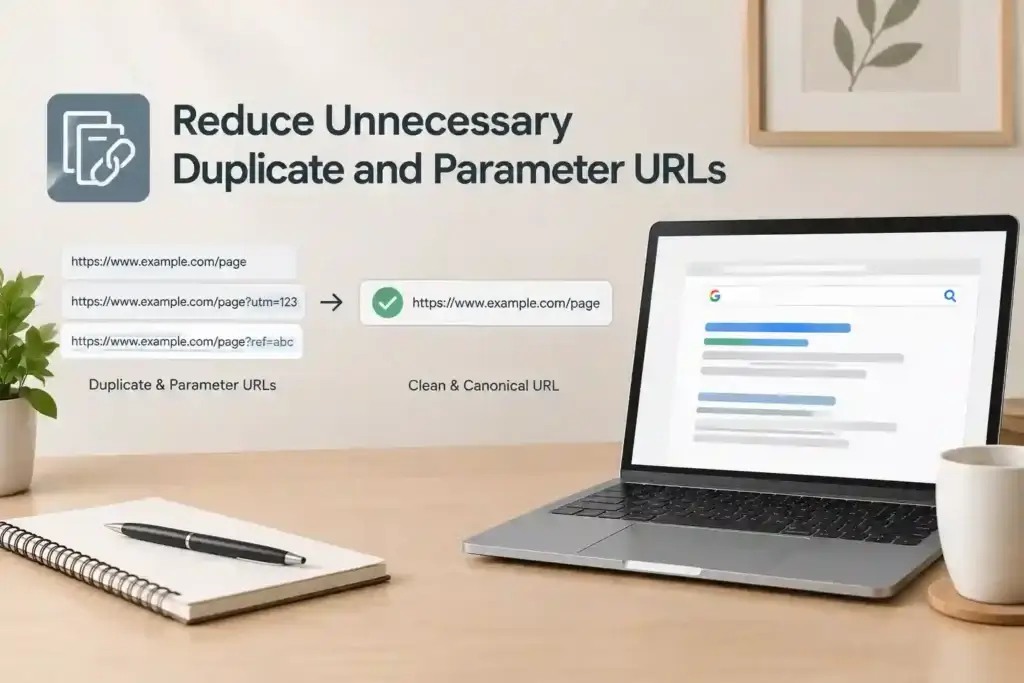
Duplicate URL variations can make a website harder to manage.
Common examples include tracking parameters, session IDs, sorting options, filter combinations, and alternative URLs that display substantially similar content.
For example, a category page might be accessible through multiple parameter combinations that do not create meaningful new content. If these URLs can be generated in large quantities, they may contribute to unnecessary crawling.
Review how these URLs are generated, linked, canonicalized, and included in sitemaps. Use canonical tags where appropriate, keep unnecessary variants out of XML sitemaps, and avoid creating internal links to endless parameter combinations.
Tip 6: Remove or Update Broken and Outdated URLs
how googlebot decides which sitemap to crawl first crawl budget Broken links and outdated URLs can create a poor experience for visitors and complicate site maintenance.
Audit important URLs and identify:
- Pages that have been permanently removed.
- Internal links pointing to 404 pages.
- Redirect chains.
- Redirect loops.
- Pages returning soft 404 responses.
- Sitemap entries pointing to outdated destinations.
If a page has a relevant replacement, use an appropriate redirect. If it has been permanently removed and has no suitable replacement, return the correct 404 or 410 response.
Avoid redirecting every removed URL to the homepage. A redirect should make sense for users and preserve the relationship between the old and new destinations.
Keep sitemap entries aligned with the current canonical URL structure.
Tip 7: Publish Useful Content and Update Pages Meaningfully
Content updates can provide a reason for search engines to revisit a page, but changing a date alone is not a reliable strategy.
Focus on meaningful improvements such as:
- Correcting outdated facts.
- Adding missing explanations.
- Improving examples and practical guidance.
- Updating product specifications or service information.
- Removing obsolete instructions.
- Improving the page’s clarity and usefulness.
For example, a technical SEO article might need a genuine update when Google’s documentation changes or when a previously recommended workflow becomes outdated.
Do not rewrite every paragraph just to make the page appear fresh. The goal is to maintain useful, accurate content rather than generate unnecessary changes.
Tip 8: Organize Large Websites with Logical Sitemap Groups

Large how googlebot decides which sitemap to crawl first crawl budget can benefit from separating sitemap files by content type or site section.
For example:
products-sitemap.xmlfor product pages.categories-sitemap.xmlfor category pages.articles-sitemap.xmlfor editorial content.locations-sitemap.xmlfor location pages.images-sitemap.xmlfor supported image sitemap information.
This structure can make sitemap maintenance and troubleshooting easier. If a particular group starts reporting errors, you can investigate it without examining every URL in one enormous file.
However, separate sitemaps do not give you a guaranteed way to control Google’s crawling order. Organizing sitemap files improves administration and diagnosis; it does not create a priority queue that website owners can dictate.
Tip 9: Monitor Crawling with Google Search Console and Server Logs
The final step is to measure what is actually happening.
Use Google Search visibility Console to review sitemap processing, URL inspection results, and available crawl statistics. Use server logs when you need to examine individual requests, response codes, requested paths, and timing.
The purpose of monitoring is to find the cause of a problem and verify whether your changes improve the situation—not to chase the highest possible crawl count. Even technically advanced websites can make mistakes that reduce the usefulness of their sitemaps and crawling signals. Avoiding these errors is an important part of how googlebot decides which sitemap to crawl first crawl budget troubleshooting, because poor URL management can create issues regardless of sitemap order.
Conclusion
Understanding how googlebot decides which sitemap to crawl first crawl budget starts with one important principle: Google does not provide a fixed sitemap-fetching order that website owners can control.
Sitemap indexes help Google discover sitemap files, and accurate modification dates can communicate meaningful updates. However, crawling also depends on Google’s systems, URL discovery, crawl demand, server health, and other technical considerations.
Start with the nine practical tips in this guide, but prioritize the actions that address your website’s actual issues. A small website may only need a clean sitemap and a logical internal linking structure, while a large e-commerce site may need deeper URL management and log analysis.
FAQ’S…
How often do Google bots crawl a site?
Googlebot crawling frequency depends on website size, server performance, content updates, and Google’s crawl demand. There is no fixed schedule for every website. Understanding how googlebot decides which sitemap to crawl first crawl budget helps you monitor crawling patterns and maintain accurate sitemaps, useful content, and a reliable website structure.
How to optimize crawl budget?
To optimize crawl budget, maintain clean XML sitemaps, improve server performance, fix broken links, reduce unnecessary duplicate URLs, and strengthen internal linking. Understanding how googlebot decides which sitemap to crawl first crawl budget helps you focus on important URLs rather than trying to control Google’s crawling order.
How to check crawl budget?
Use Google Search Console’s Crawl Stats report to review Googlebot requests, response times, and server status. Check sitemap processing in the Sitemaps report and analyze server logs for detailed crawling activity. Learning how googlebot decides which sitemap to crawl first crawl budget helps you interpret these reports more effectively.
How long does it take for Google to crawl a new page?
Google may crawl a new page within days or take longer, depending on discovery, crawl demand, and server performance. There is no guaranteed timeline. Understanding how googlebot decides which sitemap to crawl first crawl budget can help you improve discovery through accurate sitemaps and relevant internal links.
How do you get Google to crawl your site faster?
Submit your XML sitemap through Google Search Console, add relevant internal links, publish useful content, and ensure your server responds reliably. Use URL Inspection to request indexing for important pages. Understanding how googlebot decides which sitemap to crawl first crawl budget helps you improve crawlability without expecting immediate crawling.
Why is Google not crawling my website?
Google may not crawl your website because of robots.txt restrictions, server errors, poor URL discovery, or technical problems. Check Google Search Console, review your sitemap, and verify that important pages are accessible. Understanding how googlebot decides which sitemap to crawl first crawl budget helps you investigate potential crawling issues systematically.